START HERE
Getting started
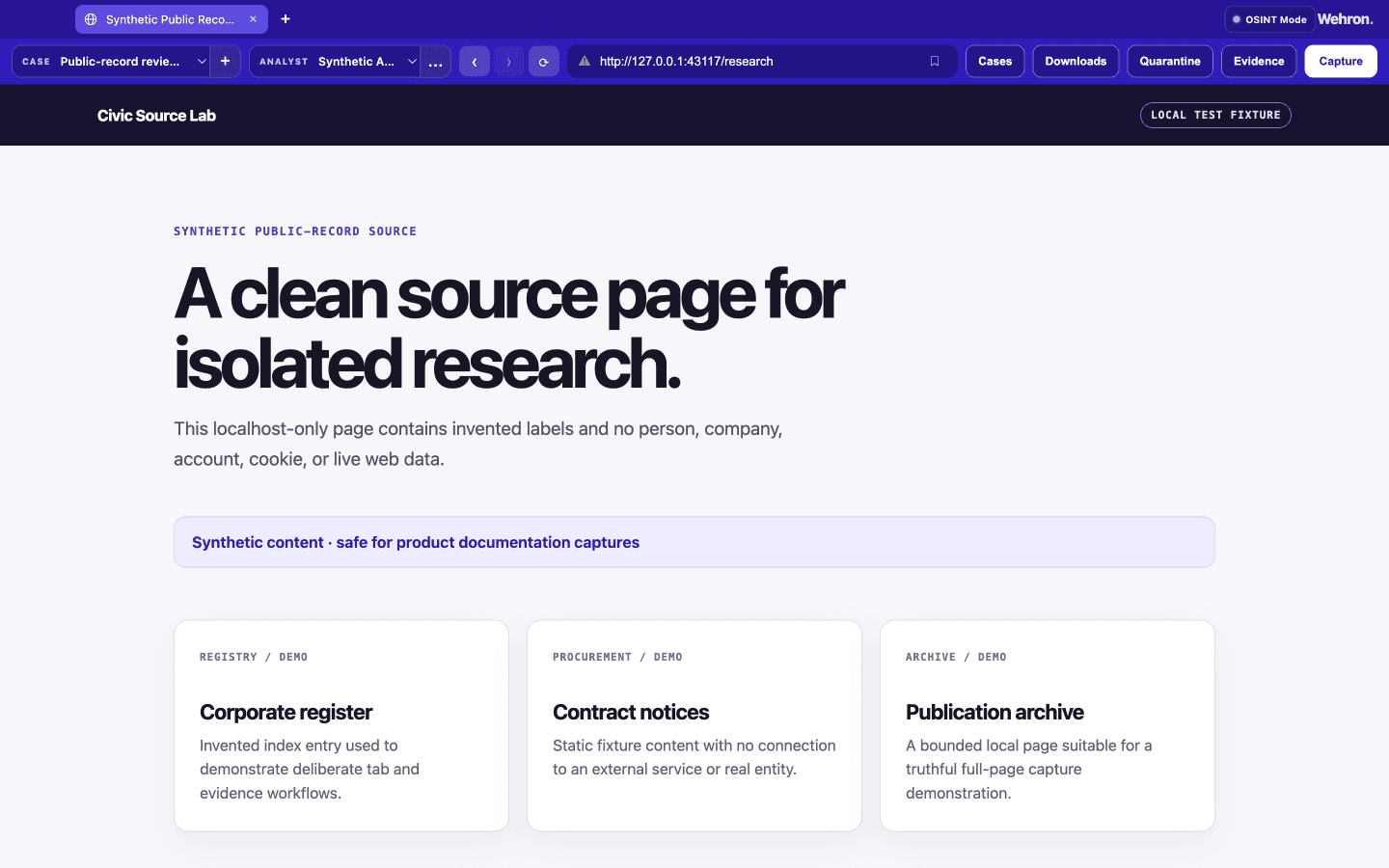
Current private engineering-alpha interface shown with synthetic demonstration data. OSINT Mode keeps the active analyst and case visible while the page remains isolated.
Current internal-preview requirements
Wehron Browser is a private engineering alpha for Apple Silicon macOS. It is not publicly downloadable, signed, notarized, encrypted at rest, anonymous, anti-detect, safe-browsing, cloud case-management, or forensically certified. Structured browser and case data is local plaintext.
Start in Browser Mode
Browser Mode opens by default. Use address or search, tabs, bookmarks, windows, history, current-run downloads, and settings for ordinary browsing. Browser Mode never selects an analyst or case and never creates research or evidence records.
Enter OSINT Mode deliberately
Use the visible OSINT Mode control, review the warning, and confirm restart. You may hand off only the exact credential-free HTTP(S) address. Then select or create a local analyst label and activate or create a case.
Browser cookies, tabs, sign-ins, and storage do not transfer into OSINT Mode. Review Security and privacy and Known limitations before case work.
Next: Security and privacy and Known limitations.